The Smith-Corona EC1100 Script in Modern Workflows: A Practical Guide
For anyone who writes, plans, or creates as part of their daily work, the tools you choose shape your process as much as your ideas. The Smith-Corona EC1100 Script sits at an interesting intersection: it is a physical typing device that produces a distinct script-like typeface, but its real value lies in how it fits into a broader digital or analog workflow. This article explains what the Smith-Corona EC1100 Script is, where it belongs in your routine, and how to integrate it smoothly with the other methods, tools, and habits you already rely on.
Understanding the Smith-Corona EC1100 Script and Its Place in Your Process
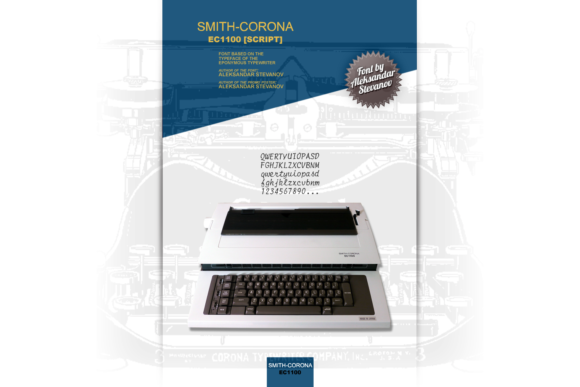
The Smith-Corona EC1100 Script is an electronic typewriter that outputs a cursive-style script font. Unlike standard typewriters that produce block letters, the EC1100 Script mimics handwriting, giving your drafts, notes, and letters a personal, handcrafted appearance. However, the machine is not just about aesthetics. Its role in a modern workflow stems from its core design: it is a dedicated, distraction-free writing tool. When you use it, you are not multitasking, checking notifications, or formatting text. You are simply typing words onto paper.
This makes the EC1100 Script most useful in phases of work that benefit from linear, focused output—planning, first drafts, brainstorming, or any task where speed and volume of ideas matter more than perfect formatting. For professionals, creators, and entrepreneurs who spend hours in front of screens, switching to a typewriter for certain tasks can reduce digital fatigue and re-engage a different kind of thinking. The EC1100 Script does not replace your laptop, tablet, or notebook. Instead, it complements them, adding a tactile, low-distraction stage to your process.
Before You Start: Using the EC1100 Script for Planning and Organization
Before jumping into a complex project, the Smith-Corona EC1100 Script can help you clarify your thinking. Many people find that typing by hand or on a typewriter forces them to slow down and be more deliberate. Use the EC1100 Script to draft outlines for a blog post, a marketing campaign, a book chapter, or a business plan. Because you can’t easily delete or rearrange sentences, you are encouraged to plan ahead and commit to a structure. The physical constraint becomes a mental discipline.
One practical approach: keep a stack of printer paper beside the EC1100 Script for morning planning sessions. Type a list of your top three priorities for the day, or sketch out the steps of a project. Afterward, transfer these typed notes into your digital task manager or calendar. The act of retyping (or scanning) reinforces the details. For educators and freelancers who prepare lesson outlines or client proposals, the script typeface adds a professional, thoughtful touch that standard printed text lacks.
During the Writing or Creative Process: Drafting with the EC1100 Script
The most natural use for the Smith-Corona EC1100 Script is during the drafting phase of any writing project. Writers, bloggers, and marketers can use it to produce the first version of an article, email, or creative piece. Because the machine produces paper copy, you cannot easily backspace and obsess over word choice. This encourages forward momentum. Once you have a physical draft, you can move to digital editing with a fresh perspective.
To integrate this into a realistic workflow, set aside 30–45 minutes for a typewriter draft. Do not worry about typos—the EC1100 Script has correction features, but you can also mark edits in pen later. After the session, scan the pages using a mobile document scanner app, then run OCR software to convert the text into an editable file. Alternatively, retype the draft into your word processor, which doubles as a revision pass. This combination of analog production and digital processing yields cleaner final work, because you have already completed a rough draft away from the temptation of editing.
For creative professionals like scriptwriters or novelists, the script typeface itself can inspire a certain tone. The flowing letters create a visual rhythm that feels closer to handwriting than to standard type. Use the EC1100 Script for first-draft dialogue, character notes, or scene outlines. The physical stack of pages also provides a sense of progress that digital word counts sometimes fail to deliver.
After the Project: Editing, Archiving, and Integrating with Digital Tools
Once you have a stack of typed pages from your EC1100 Script, the question becomes how to process that content for long-term use. Proper integration requires a simple plan. For personal projects like journals or letters, you may choose to keep the original paper. For business or client work, you will likely need digital versions. Here, the typewriter interacts with scanners, cloud storage, and OCR applications.
Scan each page at 300 DPI in grayscale or black-and-white to preserve legibility. Use an OCR tool (many free apps exist) to extract the text. The script typeface may require a higher accuracy setting, but modern OCR handles cursive fonts reasonably well. After conversion, paste the text into your working document, then edit as usual. This two-step process—typewriter first, digital refinement later—improves consistency because the initial structure is already solid.
For educators and publishers who produce multiple drafts, the physical copies become a useful archive. File them by project and date. If version control is important, the paper draft serves as a clear snapshot of your thinking at that point. This is especially valuable for entrepreneurs developing product descriptions or marketers testing copy variations.
Practical Implementation Tips for Freelancers, Bloggers, and Business Owners
Getting the most from the Smith-Corona EC1100 Script requires some preparation and consistent habits. Here are real-world tips that apply to various professional roles:
- Freelancers: Use the EC1100 Script during client briefs or project onboarding. Type a quick summary of the scope and deliverables right after a call. The physical note goes into your file folder, and the act of typing reinforces the specifics. Later, digitize the summary for your project management tool.
- Bloggers: Write your first two paragraphs on the EC1100 Script when you hit a creative block. The change of medium often breaks the logjam. Because you cannot jump around or scroll, you stay focused on the opening.
- Small business owners: Draft thank-you letters, internal memos, or product brainstorm notes on the EC1100 Script. The script typeface gives a personal feel that stands out from computer-printed correspondence. You can hand-sign each letter for an even warmer touch.
- Hobbyists and creatives: Keep a journal or a daily log using the EC1100 Script. The tactile feedback and the script output make the process more satisfying than typing on a keyboard. Over time, the collection of pages forms a unique archive of your creative evolution.
For all users, place the EC1100 Script near your regular workspace but not within arm’s reach of your digital devices. This physical separation helps you deliberately choose when to engage in analog mode. Keep a small stack of paper, correction supplies, and a pen for hand edits nearby. The machine requires power, so have an outlet available.
Ensuring Consistency and Quality in Your Typed Output
The EC1100 Script, like any typewriter, depends on proper maintenance and supplies to produce consistent results. Use high-quality bond paper that handles the impact of the typebars cleanly. Avoid thin copy paper, as the script characters may appear faint or the paper may tear. Replace the ribbon regularly—every few months of moderate use—to maintain crisp, even letters. Check the alignment by typing a few lines of test text before starting a serious project. If letters are misaligned, clean the typebars with a soft brush and isopropyl alcohol.
For long documents, plan your pagination. Because you cannot easily edit the middle of a page, decide whether you are comfortable making small hand corrections or whether you will retype entire pages. Many users find that accepting minor imperfections improves their output speed. If digital consistency is critical, use the EC1100 Script only for rough drafts and rely on your computer for final formatting.
Long-Term Considerations: Maintenance, Supplies, and Sustainability
Owning a Smith-Corona EC1100 Script means committing to a certain level of care. Ribbons are still available through specialist retailers and online marketplaces. Stock up on several ribbon cartridges to avoid downtime. Store the machine in a dry, dust-free area, and cover it when not in use. If the electronic components fail, repair may be difficult—many local typewriter repair shops can service older electronic models, but parts are scarce. Treat the EC1100 Script as a specialized tool for specific phases of your workflow, not as your primary writing device.
From a sustainability perspective, using a typewriter reduces screen time and energy consumption for short typing sessions. The paper and ribbon are consumables, but you can recycle typed pages that are no longer needed. For professionals who value the physicality of writing, the EC1100 Script offers a balanced alternative to both pure digital and pure analog methods.
Integrating the Smith-Corona EC1100 Script into your routine is not about nostalgia. It is about recognizing that different stages of a project benefit from different tools. When used deliberately—before, during, or after a project—this machine can sharpen your focus, provide a tangible record of your ideas, and complement the digital tools that handle editing, distribution, and storage. For anyone who writes, plans, or creates regularly, the EC1100 Script earns a place not as a replacement, but as a strategic addition to a well-rounded workflow.